SMS Release Alerts
Backlist sends release-day text alerts to readers who choose to receive them. This page describes the opt-in flow, what users receive, and how to opt out.
Service description
Backlist is a reading companion app operated by Backlist LLC, an Arizona limited liability company. Users who add favorite authors to their shelf may opt in to receive a single text message on the day a new book is released by any author they follow.
How to opt in
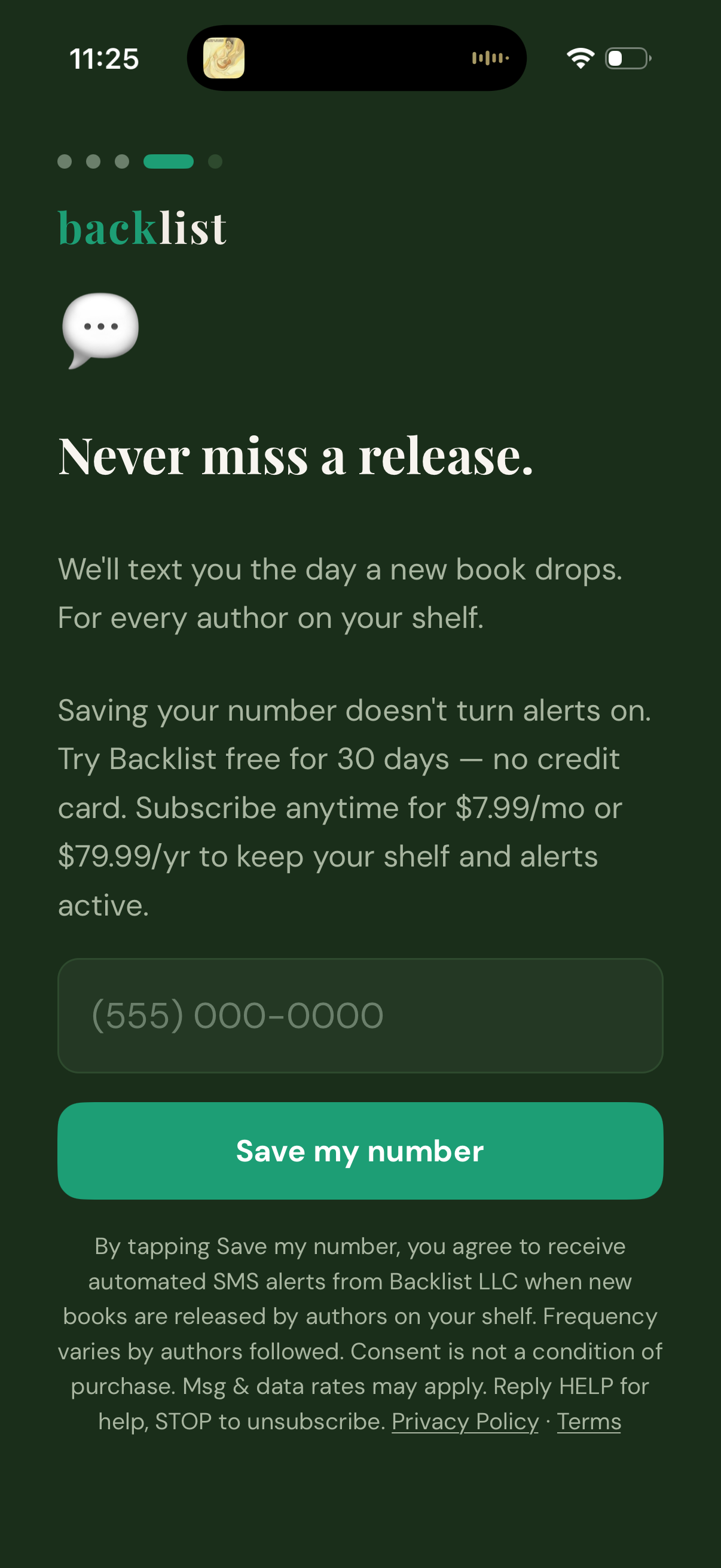
Opt-in occurs inside the Backlist iOS app during onboarding or from the alerts settings screen. The user enters their U.S. mobile number and taps "Save my number." Tapping that button is the user's explicit agreement to the SMS terms shown directly below the button.
Consent language
The following consent is displayed directly below the "Save my number" button. Tapping the button constitutes the user's agreement to this language:
By tapping Save my number, you agree to receive automated SMS alerts from Backlist LLC when new books are released by authors on your shelf. Frequency varies by authors followed. Consent is not a condition of purchase. Msg & data rates may apply. Reply HELP for help, STOP to unsubscribe. Privacy Policy · Terms
What you'll receive
Users receive a single SMS on the day a new book is released by any author they have added to their shelf. Messages are short and identify the book and author. Example:
It's here! Brad Thor's new Cold Zero just dropped. Happy reading.
— Backlist
Message frequency
Backlist messages are event-triggered, not scheduled. Users receive one text per new book release by an author they have added to their shelf. Frequency depends on how many authors a user follows and how often those authors publish — some users receive zero messages in a given month, others receive several. Backlist does not send marketing, promotional, or recurring messages.
How to opt out
Users can opt out at any time by:
- Replying STOP to any message from Backlist
- Turning off alerts in the Backlist iOS app (Settings → Alerts)
- Emailing hello@backlist.app
Reply HELP to any Backlist message to receive support information.
Carrier and rate information
Message and data rates from your mobile carrier may apply. Backlist does not charge for the messages themselves; carrier rates are between the user and their mobile provider. Delivery is not guaranteed and depends on carrier conditions.
Privacy
Backlist uses Twilio to send messages on our behalf. Your phone number is stored in Backlist's database and transmitted to Twilio only for the purpose of sending alerts you have requested. Phone numbers are never sold or shared with advertisers. See our Privacy Policy for full details.
Contact
Questions about SMS alerts? Email hello@backlist.app.